alan

Alan's musings

This story has been boiling in my head since long; today I chose to (finally) publish it.

Long story short: in order to use a certain application, I should not need to understand how to use the language or its packaging ecosystem. Delivery and distribution is a relevant part of your app.

This does not apply to libraries, frameworks, or tools that are highly contextual for a certain language/environment ecosystem, and would be used only by a developer, in any case.

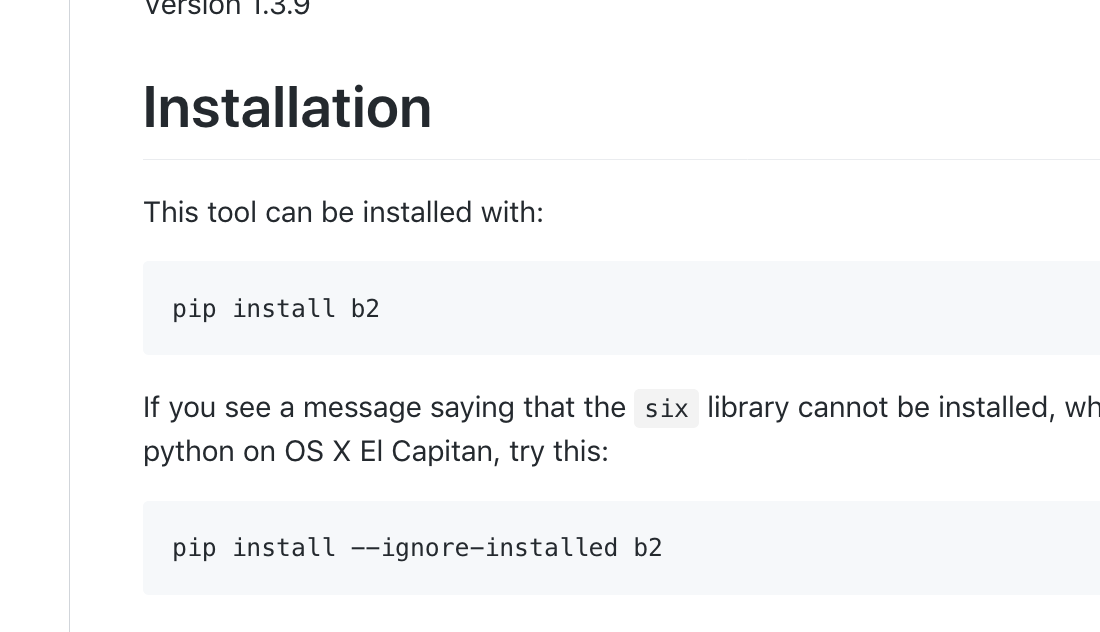
What do I mean? I'll start with an example. It's chronological, it's just the latest thing I came into; here's b2, the command line tool to get access to Backblaze B2 backup repositories. And those are its installation instructions:
GitHub\_-\_Backblaze\_B2\_Command\_Line\_Tool\_\_The\_command-line\_tool\_that\_gives\_easy\_access\_to\_all\_of\_the\_capabilities\_of\_B2\_Cloud\_Storage

  • What is pip?
  • Is such command safe to use?
  • Will it work in all situations? answers:
  • Python's package manager. It makes the b2 library available, and such library has the so-called b2 script, which exposes the b2 CLI executable.
  • possibly safe, but will install b2 within your global/per-user python dependencies, and may alter or install additional packages as dependencies, and such deps may be picked by other, unrelated software in the system;
  • it may require root to be run correctly.

Should every user of Backblaze B2 CLI know how to code in Python and understand how the Python environment works? I think that should not be necessary.

b2 is just an example, other famous tools – awscli and fpm come to my mind – just follow suit.

Most probably, if the tool you're downloading is written in C or C++, you'll probably expect to find a compiled binary, at least for some OSes and architectures; The same applies for Go, which makes binary creation for multiple platforms exceptionally easy. You should strive to provide some kind of equivalent piece of software for your users. .

But, even for tools written in Python or JavaScript (they look to be the ones that suffer most from the problem I'm describing), in most situations, the “right thing” to do is to provide a standalone binary, regardless of how it's written. You can provide standalone binaries for some archs (this is what borg does – it's a great backup utility written in Python), or you can rely on native or add-on packaging (additional repositories for Linux, choco for Windows, homebrew for Mac), like httpie. And, when you create such binary or package, you should make sure it's totally standalone (i.e. it doesn't alter global system state).

Why? Because leveraging packaging tools that were originally meant for developers of a language is brittle and risky, and can be hard to understand. You may end up compromising the system integrity if the wrong dependency slips into globally installed packages – this is especially true for Python, which is often used by many, many system tools. And, if all third-party apps did it that way, we could have continuous breakages. You can't assume yours is the only application installed in a certain system!

And, if you're writing an app, you can have full control of your execution environment and dependencies. You can choose a single Python or NodeJS version, and all of its dependencies. You don't need to support tons of variations!

In some situations, a CLI evolved out of a library. This is the case for pygments, a very nice syntax highlighting library. It's meant to be used as a library from inside python projects, but it also exposes a widely used pygmentize binary that is employed by many other tools. I'd love to have that CLI tool available as an independent, standalone package!

Final considerations:

  • As a software author, think whether you're building a library, a framework, or an application. If you're writing an application, think how you can deliver it to your final users, without the need for them to understand how you've written it.
  • If you're a maintainer for a package, think about what you're maintaining. If something is both a library and a command line tool, consider creating multiple (possibly independent) packages.

In the meantime: If you find a Python CLI tool that you'd like to use, and it uses the pip way and you don't to mess with system dependencies, I recommend pipsi. I don't know if something similar exists for Node or other environments.

FAQ: Q: But I'm a solo open source developer! Packaging this way would steal too much of my time! A: That's totally fine. Just make sure you don't suggest dangerous things to people. If you're using a developer-only approach, just state that as your target; but the tools I've written about above (b2 and awscli) certainly are of a different class.

Q: Any suggestion for easy packaging? A: I find homebrew very nice for Mac packaging and distribution. For Linux, I use fpm with docker – I've actually created a specific integration project fpm-within-docker. For Windows... no idea! I know about chocolatey and that's about it.

Photo by Malcolm Lightbody on Unsplash

#Ollivander #packaging #software #delivery

As some of my followers already know, I'm enrolled in the great Master's program at Georgia Tech, the OMSCS.

As a part of my studies, I'm doing some research to investigate the expectations gap between the higher education and the industry sectors; why does the university teach students this way? What do students expect? And what do employers and professional?

Help us by answering a small survey, or just subscribe if you'd like to receive the results when the research is completed:

https://www.misalignedtech.com/

#MostlyUnixish

Every day now and then, I get an scp command wrong. Scp is designed after commands like rcp and works totally fine for local-to-local file copy.

While this can (or could) be useful in some contexts, It's not what I like to do these days; very often, if either hosts is not remote, it's a typo on my part, and results in spurious “somebody@host.example.com” files somewhere in various directories on my disk.

So, what I like to do? I put a small script like this in my path before the actual scp executable in order to pre-check arguments, and prevent accidental local-only copies.

#!/bin/bash
ORIG="/usr/bin/scp"

for var in "$@"
do
    if [[ $var = *":"* ]]; then
        $ORIG "$@"
        exit $?
    fi
done

echo "ERROR: Missing colon. You need to pass at least one remote host specifier in source or dest"
exit 1

#MostlyUnixish #ssh #scp

UPDATE: this article was written at a time when remote work wasn't so widespread. After having worked remotely myself, I don't think that the office is so critical anymore, even though I believe it's still useful to have a nice office somewhere where you can meet people in person, every now and then. But a very nice office is even more important nowadays; if your office sucks, there're zero chance that people will want to go there!

There's one pattern that, nowadays, I find amusing; the productivity mantra is repeated everywhere. Everybody wants to get more productive, every company is trying to make their employees more productive. Robotics, AI: everything calls for it.

From Wikipedia:

Productivity describes various measures of the efficiency of production. A productivity measure is expressed as the ratio of output to inputs used in a production process, i.e. output per unit of input

So: productivity is a ratio.

That's a great idea! Let's do more work in less time, and let's use the rest of our time in other activities – be it study, research, exercise, leisure time, or whatever.

Or, let's do more work in the same time as before! That's a good idea as well; we'll achieve more, and maybe, if our company recognizes such additional value, get paid more.

But then. Open floor plans. Shared desks.

annie-spratt-604131-unsplash-1-

How can those things go together?

Focusing on software development/tech firms, there seem to exist a widespread discontent around open floor plans, and yet the number of companies adopting them seem to be growing – I don't have exact data, but it seems to be a new trend. Traditional corporations that want to start behaving like startups start ditching private offices. The usual reason: an open office workspace promotes collaboration. Yes, maybe it does. But do all the employees in a company just collaborate between each other all the time?

Most probably, they won't. Most probably, they'll need plenty of time to focus and do deep work. The risk is to overoptimize for a single aim, and forget the whole picture.

More often than not, an open office plan is a marketing synonym for let's cram how many people we can, quite at random, in the smallest possible space.

Incidentally, I think that open office workspaces are one of the reasons[1] that actually make 100% remote work positions effective: the productivity drop of open workspaces is larger than the drop caused by collaboration/communication difficulties in remote work situations.

Personally, I think that a good office trumps any other work environment/style in terms of productivity. Of course, life is a multi-objective optimization; can you find all the employees you need around a specific location? Are you paying high enough for those employees to live comfortably around that office? If any of those answers are not a definite yes, hybrid or full remote makes a lot of sense!

But, how should a good office be organized? I have experienced a variety of work environments and, well, in my opinion a sort-of open space rooms work fine, even great, but there're some dispositions:

  • Don't make them too large. Around 100/150m2 (1000-1500 sqft) should be ok to accommodate enough people working together.
  • Reserve enough space for each worker. Usually 7-10m2 (70-100 sqft) for each person is a good guidance.
  • Make sure desks are personal, and they're deep and wide enough. No desk should be narrower than 150cm (60 inches), and ideally you should aim at 180/200cm (70-80 inches). It should be possible for two people to sit at the same desk at any time, without messing with table legs, other people's legs, or any other item. Pursue no friction for collaboration.
  • Provide some place (lockers, cabinets, whatever) to let people put their personal and work belongings in, so the desktop area can be tidy and clear.
  • Provide good tools. Large screens, powerful workstations, if needed.
  • Make sure that both visual and auditory noises are minimal. While at his desk, any worker should not be able to see their peers' monitors. Phones should be silenced. People requiring to make constant noise (e.g. salesmen, tech support) should not be put in the same room as deep-working people (e.g. software developers). Carpeted floors and doors that can actually be closed can be very useful.
  • Respect privacy and safety. People should not fear shoulder surfing or that anybody could approach them without being seen, because that prevents many workers from getting relaxed enough to enter a flow state of mind.
  • Offices should not be hallways. There should be no need for somebody to cross a room just to reach another place.
  • Enforce a behavioural code. Talking is totally permitted, albeit in a low voice and not shouting around the room. I find pair programming 100% fine in such environments.
  • Provide other community space, with whiteboards, large screens, coffee, snacks, where people can meet & discuss when they need to collaborate rather than focus.

Using this kind of office space, you can accommodate 10-15 developers in a room, and change their position when they need to constantly work with somebody else. Collaboration turns out to work out properly, but distractions are limited. A decent trade-off.

What I finally argue is: if you're using an open floor plan just to cram more people in the same space, you're not improving productivity. You're (possibly) just improving total production. Because more people working in a bad environment could still produce more than fewer people in a good environment.

But, take some time to do some calculations. Your engineers are possibly the most expensive part of your budget. Are you totally sure that you'd want to spend a conspicuous amount of money for their wage, and then let them work at a fraction of their potential efficiency? This is especially relevant within the context of remote or hybrid work. Try comparing hybrid/full remote expenses to the ones of having everybody in good office, not in a terrible one.

Sure, real estate and rents are a cost. A distracting work environment won't reduce their abilities 1% or 2%. I'd speculate that the productivity drop can easily reach 20%-50%. Take note of your “developer density” and when it's approaching the limit, start looking for new office space. Don't wait to be Too Crammed To Do Anything Useful.

Sometimes I hear somebody say that “hey, that's how it works nowadays, adapt or be ejected, I can work with noise and distractions”. Let's suppose that such people actually exist and do a lot of great work; how many of them can you recruit in the current state of talent crunch? And, are you really sacrificing a lot people that could do great work on the altar of smaller offices? Remember: when creating an office space for a team, you should think about the whole team, a lot of different people. Even though it works for you, it may not work for them. That's true for hybrid/remote as well; you need to select the right people to work at the office, and those may not be the best remote workers; and vice-versa.

UPDATE July, 20th 2018: There're more and more people that agree with me about open floor plans, in that they're detrimental to productivity and conversation:

https://theconversation.com/a-new-study-should-be-the-final-nail-for-open-plan-offices-99756 https://code.likeagirl.io/a-research-roundup-to-show-that-your-office-layout-is-toxic-and-some-tips-for-making-it-better-8434864b0ab2 https://m.signalvnoise.com/the-open-plan-office-is-a-terrible-horrible-no-good-very-bad-idea-42bd9cd294e3 https://joshuatdean.com/wp-content/uploads/2020/02/NoiseCognitiveFunctionandWorkerProductivity.pdf

Photos by Breather and Annie Spratt


  1. The other one being long commutes that waste time and destroy workers' morale.

#Ollivander #productivity #industry

Every time I'm doing some data crunching on the command line, I find myself juggling between sed, awk, sort, uniq, etc. While I like the UNIX way of having one tool doing one thing well, I sometimes find it slightly boring to put all the tools together, sometimes stretching their features a bit too much.

I know that Perl and Ruby support implicit loops / prints – see this and that. Those switches makes it easy to work with data on the command line, but I don't use those languages a lot anymore, so I always need to lookup something in online manuals before performing something useful. And I never took my time to learn awk properly, so maybe I wouldn't need al that.

On the contrary, I still use Python quite a lot, and it's becoming the de-facto standard for data science purposes. Using it on the command line by piping something in & out of it, by the way, isn't always so easy – the -c switch allows passing a command in, but it's not always easy to understand whether a char is being interpreted by bash or by the python interpreter, and Python is whitespace-sensitive, too. So a command line like:

$ python -c 'import sys;for x in sys.stdin:print x'

won't “just work”:

  File "<string>", line 1
    import sys;for x in [1,5]:    print x;print x
                 ^
SyntaxError: invalid syntax

But: there's a bash feature to interpret escape sequences in single-quoted strings, so this will work fine:

$ echo -e "hello\nworld\nthis\nis\nme" | python -c $'import sys\nfor x in sys.stdin:\n    print(x.strip())'
hello
world
this
is
me

I find Python string manipulation to be great and usually fast-enough for not-so-large datasets, so you can do very interesting things and shell out to standard unix commands only if and when you actually need to. As long as you rely on the standard lib only, you're quite safe about portability, too.

AN IMPORTANT NOTE: if you're treating non-ascii data, I suggest you set the PYTHONIOENCODING variable, especially if you're using Python3, since that interpreter version converts to unicode objects wherever it is possible:

echo -e "ààà\nworld\nthis\nis\nme" | PYTHONIOENCODING='utf-8' python3 -c $'import sys\nfor x in sys.stdin:\n    print(x.strip())'
ààà
world
this
is
me

Enjoy your command line! And if you want to become a command line data processing guru, I cannot recommend this book enough.

Photo by Daniel Cheung on Unsplash

#Ollivander #python #datacrunching #MostlyUnixish

Sure, git is great. Sure it is possible to use multiple commit identities in git – just set local per-repo variables. If it weren't for the fact that chances of forgetting about it is about 99.9%.

Problem context

When installing git, it is required to configure a username and an email that end up in commit logs:

commit b8e77cefcceccddbc74cb13348ccc51d9128872f
Author: Alan Franzoni <username@franzoni.eu>
Date:   Thu Aug 3 16:35:53 2017 +0200

    Drop fc24, add fc26 support

I've got a work computer, and a personal one, but I often do some work from my own machine, and sometimes (i.e. during lunch breaks or commuting) I do some personal-related work from my work machine. So, when I clone a personal project on my work machine or vice-versa, then commit anything, I end up with mixed up work-related email & usernames.

Sure, nothing tragic, but annoying – especially if CI systems pickup commit logs for sending error mails, and I don't realize I've broken a build until it's too late.

The stupid but effective solution

On my personal workstation, I set my personal info for the global config, then override my git executable this way:

#!/bin/bash
GIT_BIN="/usr/local/bin/git"
# include the trailing slash, not a leading one for ssh/https compatibility
GITHUB_ORGNAME="MyMightyOrganization/"
OVERRIDE_USERNAME="Alan Franzoni"
OVERRIDE_EMAIL="alan@mymightyorganization.com"
if [ "$1" != "clone" ] || grep -v "${GITHUB_ORGNAME}" <<< "$@" ; then
    ${GIT_BIN} "$@"
    EXIT_CODE="$?"
    exit ${EXIT_CODE}
fi

shift

${GIT_BIN} clone --config user.name="${OVERRIDE_USERNAME}" --config user.email="${OVERRIDE_EMAIL}" "$@"
EXIT_CODE="$?"
exit ${EXIT_CODE}


I leverage the fact that it's possible to set per-repository config values that override global ones, and I hook into the clone command and set those values at clone time, so I don't risk forgetting about it. Since it's a repository property that gets set, it will work in other clients, GUIs or IDEs as well.

Photo by Andre Hunter

#MostlyUnixish #git

This is something I get asked quite a lot, so I wanted to write a piece about it.

This is an extract from the manpage from GNU grep:

NAME
       grep, egrep, fgrep, rgrep - print lines matching a pattern

SYNOPSIS
       grep [OPTIONS] PATTERN [FILE...]
       grep [OPTIONS] [-e PATTERN]...  [-f FILE]...  [FILE...]

DESCRIPTION
       grep  searches  the  named  input  FILEs  for lines containing a match to the given PATTERN.  If no files are specified, or if the file “-” is given, grep searches standard input.  By
       default, grep prints the matching lines.

       In addition, the variant programs egrep, fgrep and rgrep are the same as grep -E, grep -F, and grep -r, respectively.  These variants are deprecated, but  are  provided  for  backward
       compatibility.

OPTIONS
   Generic Program Information
       --help Output a usage message and exit.

       -V, --version
              Output the version number of grep and exit.

   Matcher Selection
       -E, --extended-regexp
              Interpret PATTERN as an extended regular expression (ERE, see below).

       -F, --fixed-strings
              Interpret PATTERN as a list of fixed strings (instead of regular expressions), separated by newlines, any of which is to be matched.

       -G, --basic-regexp
              Interpret PATTERN as a basic regular expression (BRE, see below).  This is the default.

       -P, --perl-regexp
              Interpret the pattern as a Perl-compatible regular expression (PCRE).  This is highly experimental and grep -P may warn of unimplemented features.

So, -F is a short format form, while --fixed-strings is a long format form.

When should I use either form?

My take is: when working interactively, do whatever you like. Whenever you are writing a script to be reused, strive to use the long format options as much as possible.

Why?

Nobody cares about what you do on your computer. But whenever you write a script that should, later on, be used and read by other people – or just yourself in the future – the long form is often self-explanatory. Instead of opening the manpage and looking for cryptic -K -X -i, you can just read the option! It will for sure save more time than what you spend while typing a few more chars.

There're a few exceptions to this rule:

  • if the option is very common. Feel free to use -E and -P for grep, as they're very well known and widespread options for this command.
  • if you need portability between different OSes (e.g. MacOS+Linux+BSD) and the long format option is not available somewhere; this sometimes happens.

Why is this cool?

Consider this command, which is the recommended way to install the great MacOS package manager Homebrew:

/usr/bin/ruby -e "$(curl -fsSL https://raw.githubusercontent.com/Homebrew/install/master/install)"

Such curl command is quite common in many installers; can you tell what such options do? Can't you? Consider this line:

/usr/bin/ruby -e "$(curl --fail --silent --show-error --location https://raw.githubusercontent.com/Homebrew/install/master/install)"

I bet you can now understand what it does; maybe the last flag is a bit vague (it tells curl to follow redirects via Location headers), but the overall feeling is simply... great!

Photo by Alex Holyoake on Unsplash

#Ollivander #shell #bash

The internet is getting noisy. Too noisy. Having grown up in the nineties, with 56k dial-up, I sometimes struggle to understand how little I'm accomplishing today with all the bandwidth I can leverage.

There were some key factors that made the old internet so productive, by the way, and many of those factors are just gone.

This is not just a rant. I have some proposals as well.

Discussing

Most discussions on the internet once happened in Usenet newsgroups and mailing lists. You could even access mailing lists via NNTP (the newsgroup protocol) using a great service like gmane.

40tude Dialog

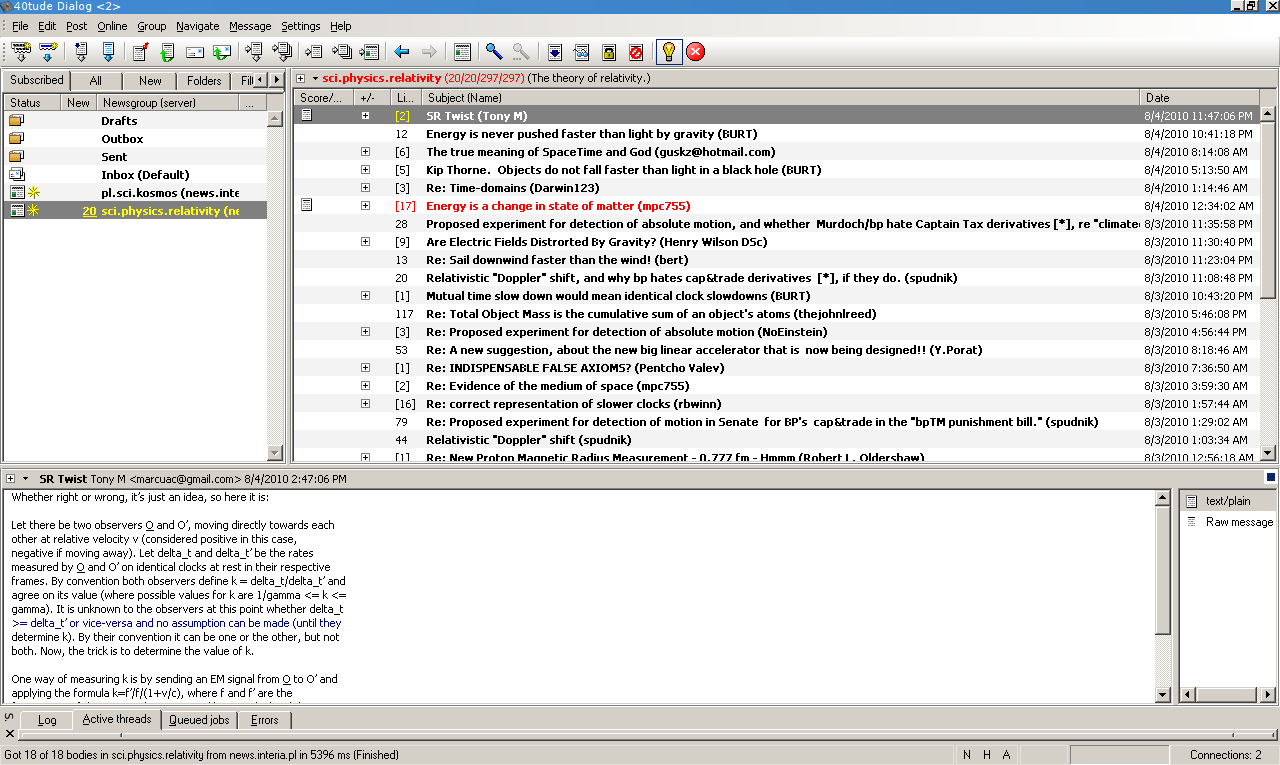
40tude Dialog was my favourite newsreader at the time. I could subscribe to a lot of different newsgroups, without needing to sign up for each of them, and it was very easy to catch up with lots of traffic – just a matter of checking which messages had still the title in bold.

There was a single application with a consistent interface to access the most disparate groups, and topics were widely enforced – probably the most common complaint from newsgroup users was that somebody was off topic – such discussions were quickly criticized and got little attention.

Chatting

There once was IRC, the Internet Relay Chat. mIRC was the king of clients for a while.

an irc chat

IRC, sometimes, was not great, lacking some advanced features for multimedia and emojis, but it was good. There were plenty of channels with specific topics, and you could join them in a second.

Then, other instant messengers picked up – ICQ, MSN, AOL, etc – but it wasn't a great issue; the protocols they used were mostly simple, and tools like Trillian and Pidgin/Adium quickly reversed them and let the users just pick one client with multiple connections. Skype was a bit of a white fly because its original protocol was harder to reverse.

Again, there was an easy way to get a consistent interface in a single application to chat on IRC, Google Chat, Facebook Chat, generic XMPP, and so on.

Getting notified about updates

Oh, this is was easy, wasn't it? RSS and Atom just ruled the world. Bloglines and the beloved Google Reader were the first stop, every morning, for many developers.

Some blogger just putting too much shit on its blog? We remove him from our feed! No matter what!

google reader

We could simply pull our update sources within one single application, and check all the updates when we had the time to.

I can remember my workflow: scroll through the sources, open any interesting article in a new tab, mark all feeds as read; then go through the tabs until I finished. Job done. I could, at the same time, read a lot of interesting thing and discard a lot of uninteresting shit.

What happened

If you take a look at was the state of things, you can notice that:

  • Focus is lost; once, everything went around topics. Channels had topics; newsgroups had topics; blog had topics (one great rule for a blog was to have a 'razor sharp' focus). Nowadays we have people instead of topics. I have nothing against people, but maybe, if I follow a great software architect, I'd like to hear what he's got to say about software, not about other shits.
  • There are multiple platforms lacking an API: nowadays I'm forced to switch between Slack, Telegram, Whatsapp, Discord, Skype and whatever IM is going to be the most hip tomorrow. There are hundreds of forums – maybe the retain a topic, but they don't offer a consistent way of pulling content into a single application. Facebook and Twitter – while there used to be some apps that allowed integrating such feeds into a single app, they're long gone as far as I know. StackOverflow mitigates the issue with an acceptable RSS feed, even though it's not as customizable as I'd like. Many websites just stopped offering RSS feeds at all, or stopped making them customizable, and just push their updates – ALL of their updates – on Facebook and Twitter. I used to be an avid Lifehacker reader, back when they had category-based RSS feeds, but at once... they just stopped providing such service.
  • Can't mark things as read. Have you ever noticed that? Inbox Zero once was a good practice for every workflow. Facebook and Twitter simply don't allow this functionality. You cannot mark a tweet or post as read, it could resurface at any time. And you cannot see which posts or tweets you've not read yet – probably because the amount would be simple overwhelming. You need to waste your time on such websites.
Where we want to go

We want to reverse all this. We need:

  • Topics. Google Plus created somethings similar to that with Collections (without RSS, of course); or we could just create a blog or username for each of our topics – I think most of us won't discuss about so many totally unrelated different fields. It's a change of mentality – we shouldn't write something just because we can. Unless we are celebrities, people, especially strangers, won't follow us just for the sake of it – we need actual, quality content. Smallchat is fine on FB or Twitter.
  • APIs. I'm not saying we should get back to IRC or to NNTP. But we need a common API for Instant Messaging and forum-like software, so that people can use their favourite tools to organize their data sources. Installing tens of apps or visiting tens of websites every day is not an option.

Incidentally, this is not a call for the open internet; I could not care less if there's a leading provider for content, as long as such content is accessible in a standard way.

This is a call for a useful internet back again.

(Incidentally, this is not the usual focus of this blog, which is mostly technical. But I hope my audience will forgive me, this is something important, IMHO).

EDIT: an interesting discussion arose on Hacker News

#Ollivander #rants #thoughts

There seems to be a common belief about computer science: people either get it, or don't get it.

A recent paper by the University of Toronto, Evidence That Computer Science Grades Are Not Bimodal, dispels such myth.

The paper even suggests some explanations for this myth: teaching failure. We don't know how to teach computer science; so, it seems that some people succeed at learning despite teachers' inability to convey CS concepts.

I think the idea is interesting and very appropriate; I have some opinions of mine:

  • We should make people enjoy computer science! A lot of students get their grades and they can't write ten lines of code! But coding is actually the most interesting and amusing part of computer science, where you can actually do things and see how they work. Let's put more tinkering into CS courses!
  • We should put some effort at making CS cool. As long as people regard CS as boring, they don't take that journey.

Otherwise, we risk an even further split between practitioners, those that learn by doing and that sometimes don't have a formal education, and the academics, that live in the walled garden of universities and have little to no contact with the industry.

#Ollivander #teach #cs #industry #academy

Really. Stop (ab)using just strings and integers!

Yes, they're the building blocks of whatever you do. But if you abuse them, you're not taking full advantage of your Object Oriented programming language.

Let me explain with some concrete example. For the sake of conciseness, I'll use Python here, but the concepts fit most OO languages. Classes are your friends.

Really. Classes and type systems weren't invented to make you feel miserable and add bloating to your code. They were invented to help you to write correct code, letting the machine verify you're doing things properly and consistently.

But if you don't use them, the machine can't help you. And no, dynamically (yet strongly typed) languages aren't a good reason to skip correctness and proper OO design.

Let's start with some examples:

def retrieve_web_resource(http_url):
    #[...]
    requests.get(...)

What is that http_url ? In many contexts, it will probably be a string. But this is not a best practice. Primitive types like strings carry very little semantics and probably do not enforce domain boundaries. What does that mean?

It means that somewhere in your code you have something like

    my\_http\_url = somewhere.create_url_from()

(with my_http_url still being of type str) and then you carry it around as a str. Maybe, at some point, you manipulate it. And, possibly because of some error or because some unexpected data was thrown in, at some point it ceases being a valid http url.

This might mean that, in many parts of your code, whenever you use such value, you may be tempted to check some preconditions:

def retrieve_web_resource(http_url):
    assert http_url.starswith("http"), "not an http url"

But then, you need to check those preconditions everywhere!

And, if you happen to pass your variable around, and at some point you pick a less-than-meaningful variable name, it may be hard to understand, when debugging or if a serious error happened that totally messed up the content, what that variable was supposed to contain.

So, what is a much better solution? Create the right type, always, and use those types in your application. Example:

class HTTPURL(object):
   def __init__(self, scheme, host, path, query=None):
       if scheme != "http":
            raise ValueError, "not an http url"
       # validate host
       # validate path
       # validate query - should be a param-value dict
       self._host = host
       self._path_parts = path_parts
       self._query = query if query is not None else {}

   @classmethod
   def parse_from_str(cls, http_url_as_str):
       # parse the url, then
       return cls(scheme, host, path, query)

   def add_query_param(self, param, value):
       # add param and value to dictionary, return a new
       # HTTPURL object with that additional value. Raise
       # an error if such value is already defined

   def append_path(self, additional_path):
       # properly append additional_path, checking for 
       # missing or duplicate initial slashes, etc, then
       # return a new HTTPURL object.
    
   def __str__(self):
       # create the url from current variables, and return it as
       # a str

(this is simplified – you might want to add auth data, port, etc)

See the point? You're making sure that no invalid http_url instance can exist, and you're providing proper methods to manipulate such instance. This way you're encapsulating your domain knowledge about URLs in a specific class, instead of scattering and duplicating it everywhere and you're making it really hard for users to commit accidental mistakes – they would be caught quickly.

The HTTPURL we've seen here is composite and this approach may make a lot of sense, but in Python you can even use Tiny Types in a very, VERY efficient fashion, when you just need to add some semantics and some validation without a full-fledged class because you just don't need that kind of manipulation:

class Angle(int):
    def __new__(cls, v):
        if isinstance(v, Angle):
            return v
        if v < 0 or v > 360:
            raise ValueError("invalid angle, must be within 0 and 360")
        if not isinstance(v, (int, long)):
            raise TypeError("invalid angle type, must be int or long")
        return super(Angle, cls).__new__(cls, v)

See? The instances you create are of type Angle, but they're still an int! So you can pass them straight to other apis/libraries that just don't support or know nothing about your custom types, and yet you get semantics and validation!

Of course, if you need more operations you'll need to redefine more methods:

class Angle(int):
    def __new__(cls, v):
        if isinstance(v, Angle):
            return v
        if v < 0 or v > 360:
            raise ValueError("invalid angle, must be within 0 and 360")
        if not isinstance(v, (int, long)):
            raise TypeError("invalid angle type, must be int or long")
        return super(Angle, cls).__new__(cls, v)

    def __add__(self, other):
        return Angle(int(self) + int(Angle(other)))

angle = Angle(10)
angle2 = Angle(2)
angle3 = Angle(angle2)

print angle+angle2
print type(angle+angle2)
12
<class '__main__.Angle'>

Do you think all that is too verbose, and you'd just prefer to stick to string and ints? Well... I suggest you try this approach, check how many bugs you prevent and/or how your code becomes more expressive and cohesive, and then think again about verbosity. If your code is more compact at the expense of correctness and automated checking, maybe that compactness isn't worth it.

#Ollivander #programming #TypeSystem